 Plainlist
One-Time-Purchase To-Do Apps for Mac: What You Actually Own When You Pay Once
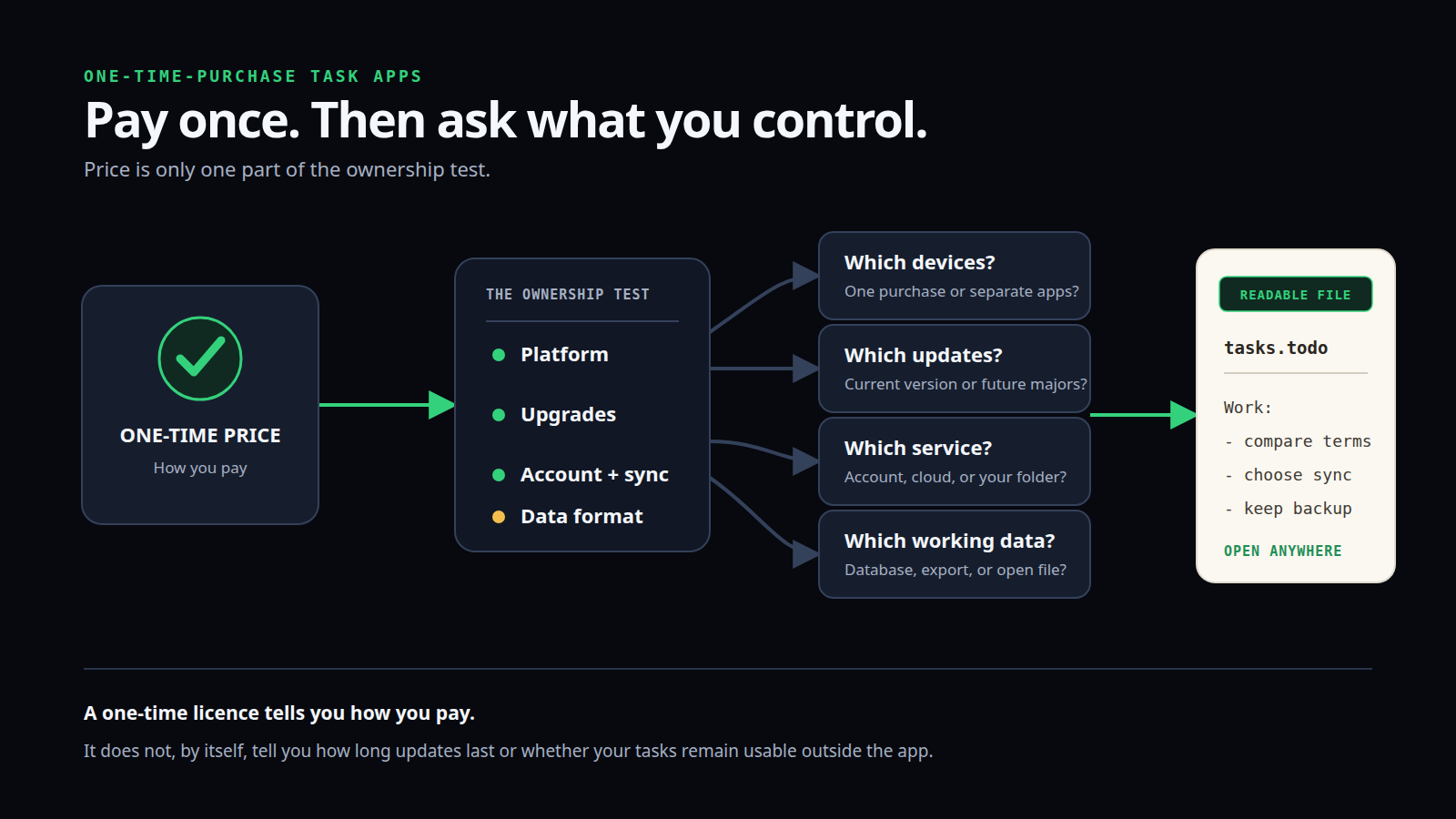
Paying once for a Mac to-do app can remove a recurring bill. It does not automatically tell you which devices are included, whether future major upgrades cost extra, whether sync needs an account, or whether your tasks remain usable outside the app.
Those details matter more than the sticker price. A $25 app with an ordinary text file is a different kind of purchase from a $50 app whose polished database and cloud sync are part of the product. Neither model is automatically better. The right choice depends on what you want to control.
Quick answer: choose PlainList if you want the lowest current price in this comparison and a readable task file you control; Things 3 if you want a polished Apple-native experience and accept separate app purchases; TaskPaper if you want a mature plain-text outliner with deep keyboard and scripting support; or OmniFocus 4 if you need a more powerful Apple-wide task system and clear version-based perpetual licence terms.
Deterministic PlainList-branded editorial diagram. It explains a purchasing test; it is not a product screenshot or a representation of any competitor interface.
The PlainList price is $19.99 once
The current PlainList product page states: 14-day free trial, then $19.99 once. It also says there is no subscription and no account.
The same page describes macOS as the mature build, Linux as an early beta, and Windows, iOS, and Android as planned. It does not publish a promise about the treatment or price of a future major version, so this article does not invent one.
What “one-time purchase” can mean
The phrase sounds simple, but vendors use several structures.
Pay once for the current app
You buy the app that exists today and continue using it under its stated compatibility and licence terms. Minor updates may be included. A future major version may be free, discounted, or sold again.
OmniFocus is unusually explicit: its current purchase page says a perpetual purchase owns version 4 forever, includes all 4.x updates, and makes future major upgrades available at a discount.
Buy each platform separately
The Mac app can be a one-time purchase while the iPhone, iPad, or headset version is another purchase. Things 3 uses this model. The current US Mac App Store listing is $49.99, while the iPhone, iPad, and Vision Pro apps are sold separately.
This is still a no-subscription model. It simply means “pay once” applies to each app, not automatically to every device.
Buy one universal licence
OmniFocus 4 sells one current perpetual licence across Mac, iPhone, iPad, Apple Watch, and Apple Vision Pro. The current price is $74.99 for Standard or $149.99 for Pro.
Its optional web companion and subscription are separate choices. A product can offer both a perpetual licence and subscriptions without making the perpetual option less real.
Buy an app that works on ordinary files
PlainList and TaskPaper use readable plain-text task files. The working document is not merely an export created when you leave; it is the material the app edits.
That does not guarantee every advanced feature will look the same in another editor. It does mean the task text is directly inspectable without recreating the database through an export tool.
Comparison at a glance
Prices below are current US-dollar prices shown on official pages on 26 September 2026. Your App Store may use a different regional price or tax treatment.
Swipe or scroll sideways to view every column.
| App | Current one-time option | Purchase scope | Published upgrade wording | Sync and account | Working task data |
|---|---|---|---|---|---|
| PlainList | $19.99 | Mature macOS app; Linux beta also available | Future-major policy not stated on the checked page | No PlainList account; you choose a local or synced folder | TaskPaper-compatible plain UTF-8 .todo file |
| TaskPaper | $24.99 on the US Mac App Store | Mac | Product site calls it “finished software,” maintained for current macOS; future-major pricing not stated | No TaskPaper cloud required; files can live in a folder you sync | Plain-text files editable in other tools |
| Things 3 | $49.99 for Mac on the US App Store | Mac purchase; iPhone, iPad, and Vision Pro apps sold separately | Future-major policy not stated on the checked pricing page | No cloud needed for one device; free Things Cloud account required for multi-device sync | Local app database; access on supported devices through Things |
| OmniFocus 4 | $74.99 Standard or $149.99 Pro | Universal purchase across supported Apple devices | Includes all 4.x updates; future major upgrades discounted | Omni Account used for trial, purchase/unlock, licence history, and optional Omni Sync | OmniFocus database with app-provided viewing and export paths |
Do not treat one row as the universal winner. It shows four different bundles of product, platform, service, and data model.
For an open file: PlainList
PlainList is the clearest fit when the file matters as much as the interface.
Its current product page says the app edits one TaskPaper-compatible plain-text .todo file stored in any folder you control. You can use a local folder or a folder synced by iCloud Drive, Dropbox, Git, or another method you already trust. There is no PlainList account and no required PlainList cloud.
Inside the app, the same file appears as Editor, Plan, Focus, Goals, Habits, and Done views. Outside the app, it remains readable text.
Why buy it
- $19.99 once after a 14-day trial
- account-free and local-first
- readable working file rather than export-only access
- Plan and Focus views over TaskPaper-compatible text
- macOS 12+ support on Apple Silicon and Intel
- Linux beta if you want to test the same model there
What to accept
- macOS is the mature release; Windows and mobile apps are still planned
- sync quality depends on the folder service and workflow you choose
- the current site does not promise how a future major paid upgrade would work
- a file-first app does less service work for you than a full cloud task platform
Choose PlainList when you want planning views but do not want the task system to become an app-only database. See PlainList versus Things 3 for the direct comparison, or plain-text task management for the file model.
For a polished Apple experience: Things 3
Things 3 is a strong choice for someone who wants a calm, highly finished Apple-native task manager and does not need collaboration.
The current US Mac App Store listing shows $49.99. Cultured Code's pricing page explains that Apple determines regional prices and links separate Mac, iPhone, iPad, and Vision Pro purchases.
Things Cloud sync is free. Cultured Code's sync documentation says the Mac app can be used without Things Cloud on one device, while multi-device sync requires a free Things Cloud account. Third-party sync services are not supported for the Things database.
Why buy it
- refined Today, Upcoming, projects, areas, tags, reminders, and quick entry
- strong Mac, iPhone, iPad, Watch, and Vision experience
- free first-party sync after purchasing the relevant apps
- local offline access on each configured device
- no recurring fee for the apps you buy
What to accept
- the $49.99 Mac purchase does not include every other platform app
- multi-device sync uses Things Cloud, not your own folder service
- you view tasks through supported Things apps rather than editing an ordinary task document
- the checked pricing page does not make a promise about a future major version
Choose Things 3 when interface quality and the Apple ecosystem matter more than direct access to the working data file.
For a minimalist plain-text outliner: TaskPaper
TaskPaper is a mature plain-text list tool. The current US Mac App Store listing shows $24.99 and describes ordinary plain-text files, projects, tasks, notes, tags, filtering, folding, focus, keyboard commands, stylesheets, and a JavaScript API.
Its product site says TaskPaper is “finished software”: polished, balanced, and updated for the latest macOS, without an expectation of big new features. That is useful information for a buyer. You are purchasing a stable tool, not a public promise of an expanding roadmap.
Why buy it
- direct plain-text files
- mature TaskPaper grammar shared with other tools, including PlainList
- fast filtering, folding, focusing, and keyboard navigation
- scripting and stylesheet support
- simple Mac-only purchase
What to accept
- it is primarily an outliner and text task environment, not a visual calendar planner
- the developer does not expect big new features
- sync is a file-location decision rather than a built-in collaboration service
- future-major purchase terms are not stated on the checked product or App Store page
Choose TaskPaper when you want text, filters, and scripting with the least visual planning layer.
For an advanced task system: OmniFocus 4
OmniFocus 4 is the power-user option. It offers projects, tags, dates, perspectives, review workflows, and a consistent system across supported Apple devices.
The official purchase page is also the clearest about licence scope:
- $74.99 for Standard
- $149.99 for Pro
- one purchase across Mac, iPhone, iPad, Apple Watch, and Apple Vision Pro
- all 4.x updates included
- future major upgrades available at a discount
The current builds require macOS 15.2 or later on Mac. That compatibility floor is much newer than PlainList, Things 3, or TaskPaper, so check your hardware before choosing it.
Omni's account documentation says an Omni Account is used for trials, purchasing and unlocking, licence history, discounted upgrades, and optional Omni Sync. Perpetually licensed apps can work offline after unlocking while you remain signed in to the same account.
Why buy it
- clear version-based perpetual licence terms
- universal Apple-platform purchase
- deep organisation and custom perspectives
- optional encrypted Omni Sync and web companion
- upgrade discounts explicitly stated
What to accept
- higher upfront price
- an Omni Account is part of purchase and activation
- macOS 15.2 or later is required for the current version
- the task database and advanced structure are designed to be used through OmniFocus, even though export paths exist
Choose OmniFocus when task-system depth and cross-device Apple support justify the additional cost and structure.
Paying once is not the same as owning the data
“Ownership” is an imprecise word unless you separate its parts.
You can own a licence
A perpetual licence normally means your right to use a defined version does not expire merely because a billing period ends. It does not guarantee compatibility with every future macOS release, free access to a future major version, an operating sync service forever, or continued vendor development.
Read the actual product wording. OmniFocus states the version boundary. Other vendors may state only that the current purchase is one-time.
You can control the working file
PlainList and TaskPaper make the task document directly accessible as readable text. You can copy it, back it up, search it, version it, or open it with another text editor.
That is stronger than “export supported” for someone who wants low exit friction. Export is still valuable, but it is a conversion step. A working file already exists in a form other tools can read.
You can depend on an app database
Things and OmniFocus use richer app-managed databases to deliver features, sync, structure, and consistency. That model can be worth the trade-off. It just means your continuity plan is different: keep supported devices, understand account and sync requirements, and periodically test available export or backup paths.
You still need a backup
An open file is not automatically safe. If you delete it from a synced folder, that deletion may sync too. Keep version history or an independent backup.
Likewise, offline access to an app database is not the same as a tested restore. Know how the product backs up data and what you would do after a failed device, lost account, or discontinued service.
A practical ownership test
Before buying any no-subscription Mac task app, answer these questions.
1. What exactly does the purchase cover?
Is it one Mac app, every Apple device, a number of seats, or a specific major version? Are mobile apps separate?
2. What does the vendor promise about updates?
Does the page mention all updates, current-major updates, discounted major upgrades, or nothing? Do not convert silence into a promise.
3. Does the app require an account?
Separate activation from daily use and sync. An account may be required to unlock a perpetual licence, optional only for sync, or not required at all.
4. Where is the working data?
Is it an ordinary file, a local database, a cloud database, or a local database with cloud sync?
5. Can you use another sync method?
File-based apps may let you choose iCloud Drive, Dropbox, Git, or a local-only folder. App databases may require the vendor's service.
6. What happens if you stop using the app?
Can you read the working file directly? Is there an export? Which structure, dates, attachments, recurring rules, and completion history survive?
7. Does the app fit your actual devices?
A cheap Mac-only app can be expensive if you need reliable phone capture. A universal Apple licence may be wasteful if your work stays on one Mac.
Which app should you choose?
Choose PlainList if
- you want a low-cost, one-time Mac purchase
- your tasks should remain a readable file
- you prefer keyboard-first text plus Plan and Focus views
- you are comfortable choosing your own folder and sync method
- you can live without mature mobile apps today
Choose Things 3 if
- you want a polished Apple task experience
- Today and Upcoming views fit your planning style
- you are willing to buy each platform app separately
- Things Cloud is an acceptable sync dependency
- collaboration is not required
Choose TaskPaper if
- a plain-text outliner is enough
- filters, folding, theming, and scripting matter
- you want a mature Mac tool with a deliberately limited roadmap
- you do not need a visual planning calendar
Choose OmniFocus 4 if
- you need powerful project, tag, review, and perspective features
- one purchase across current Apple platforms has value
- the published 4.x and future-upgrade terms are reassuring
- macOS 15.2 compatibility is not a problem
- an Omni Account and app-managed database fit your workflow
Frequently asked questions
Is a one-time-purchase app the same as a lifetime licence?
Not necessarily. “Lifetime” can refer to the app version, the product, the buyer, or the vendor's service, and those are not the same. Prefer the vendor's exact wording. This article uses “one-time purchase” or “perpetual licence” only where the official page supports it.
Which option has the lowest current price?
PlainList at $19.99 is the lowest current price in this four-app comparison, followed by TaskPaper at $24.99, Things 3 for Mac at $49.99, and OmniFocus 4 Standard at $74.99. Regional App Store prices can differ.
Which apps keep tasks in plain text?
PlainList and TaskPaper use readable plain-text working files. PlainList uses a TaskPaper-compatible .todo file; TaskPaper uses its own plain-text task documents with the same basic project, task, note, and tag grammar.
Which purchase covers iPhone and iPad too?
OmniFocus 4's current perpetual purchase is universal across its supported Apple devices. Things sells its platform apps separately. PlainList's mature release is currently macOS, and TaskPaper is Mac-only.
Do I need a subscription for sync?
Not for the apps compared here. PlainList and TaskPaper can use a folder and sync service you choose. Things Cloud sync is included after purchasing the relevant apps. OmniFocus offers Omni Sync with its licence; web access is a separate recurring option.
Is an open file always better?
Only if direct file access matters to you. An app-managed database can provide smoother sync, richer structure, and stronger cross-device behaviour. The important point is to choose the trade-off deliberately.
Buy the model, not only the price
A one-time price answers one useful question: will this app charge you every month or year?
Before buying, ask four more: which platforms are included, what happens at the next major version, which account or sync service is required, and what form your task data takes.
If you want a task manager built around a file you can keep using elsewhere, try PlainList. The 14-day trial lets you test the real workflow before paying $19.99 once. If a polished Apple database, a pure text outliner, or a deeper GTD system fits better, choose that instead—the purpose of ownership is to reduce friction, not create a new ideology.
Sources checked
- PlainList product page — $19.99 current one-time price, 14-day trial, no subscription, no account, platform status, local TaskPaper-compatible file, and user-chosen sync folder.
- Things App Store pricing — regional pricing explanation and separate platform-app links.
- Things 3 for Mac on the US App Store — $49.99 Mac price, current macOS requirement, separate-device wording, and feature overview.
- Things Cloud support — free sync, account requirement for multi-device use, no third-party sync, and single-device use without Things Cloud.
- TaskPaper product page — current “finished software” positioning and maintenance wording.
- TaskPaper on the US Mac App Store — $24.99 price, Mac requirement, plain-text model, and current features.
- OmniFocus 4 purchase page — Standard and Pro prices, universal purchase, 4.x updates, future-major discount wording, current system requirements, and optional web/subscription terms.
- Omni Account documentation — account role in trial, purchasing, unlocking, licence history, discounted upgrades, offline use, and optional sync.