 Plainlist
NotePlan Alternative for Mac: Plain-Text Planning Without Living in a Notes App
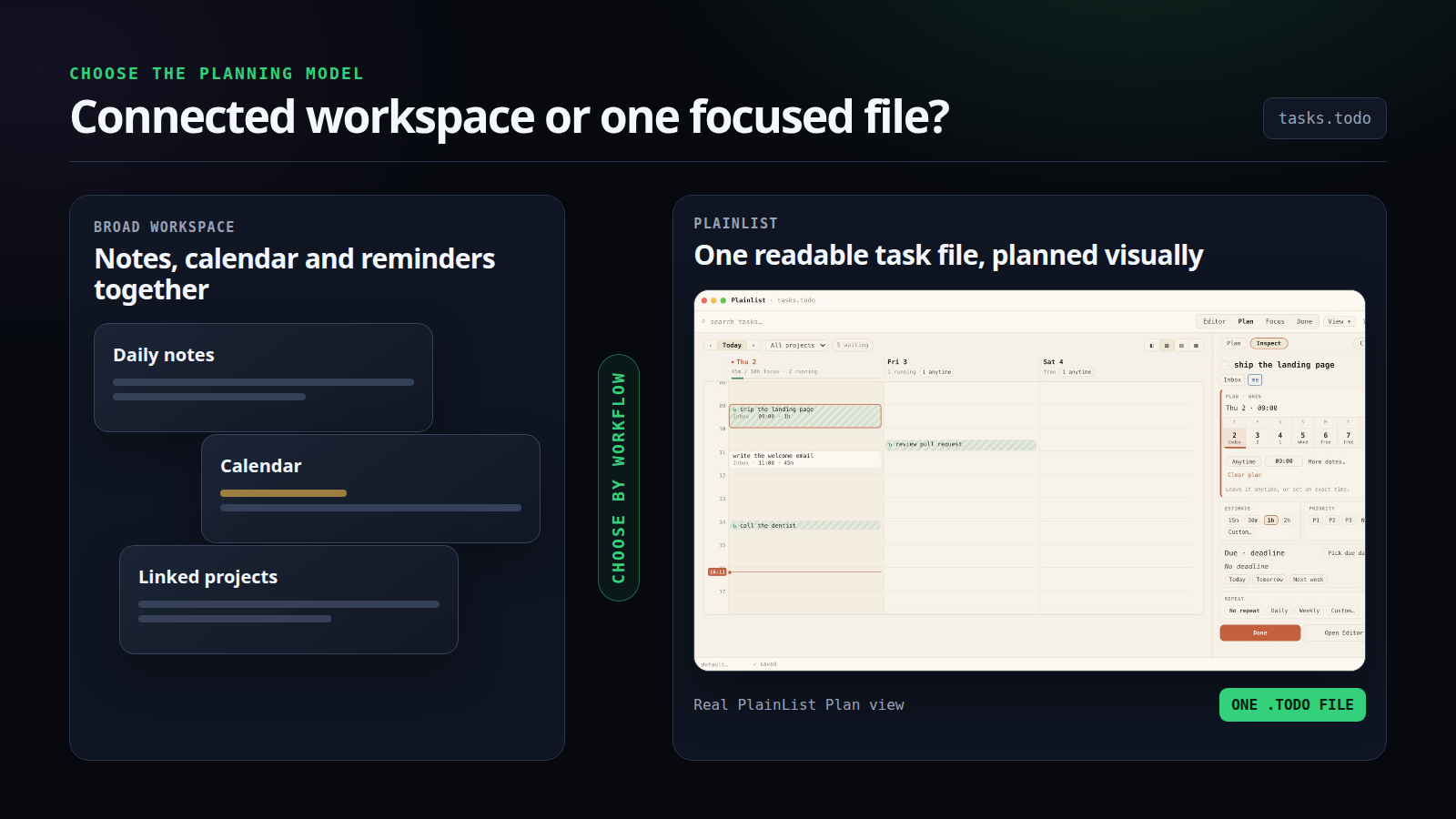
Editorial comparison graphic using an official Plainlist Plan screenshot. The broad workspace is conceptual and does not depict NotePlan product UI.
If you use NotePlan for its daily notes, linked project notes, Apple Calendar, and Reminders, Plainlist is not a like-for-like replacement. NotePlan is the better fit for that combined workspace.
Plainlist is the alternative for a narrower need: you want to plan
your day in one readable task file, without turning the planner into
your notes system. It gives you Plan, Focus, and Done views over a
TaskPaper-compatible .todo file, with no account and no
subscription.
Quick verdict: choose NotePlan when notes, calendar events, reminders, and tasks need to live together across Apple devices and the web. Choose Plainlist when you want a focused Mac planner over one task file you control, and you are comfortable keeping notes and calendar events elsewhere.
Both products use readable text files. The real choice is not open files versus lock-in. It is a broad notes-and-calendar workspace versus a focused task planner.
NotePlan and Plainlist at a glance
Swipe or scroll sideways to view every column.
| NotePlan | Plainlist | |
|---|---|---|
| Core model | Daily and project notes with tasks and calendar context | One .todo file with planning views |
| File format | Plain Markdown notes stored on your device | TaskPaper-compatible plain text |
| Main planning surface | Daily notes, timeline, calendar, and periodic notes | Plan, Focus, and Done views |
| Notes and backlinks | Yes | No; it is not a notes app |
| Calendar and Reminders | Built around Apple Calendar and Reminders | No built-in Apple Calendar or Reminders integration |
| Platforms | Mac, iPhone, iPad, and web | macOS 12+; Linux beta; Windows and mobile planned |
| Sync | Native iCloud sync; web access | Put the file in a folder you already sync, such as iCloud Drive, Dropbox, or Git |
| Habits and goals | Notes, templates, tasks, and plugins can support broader systems | Built-in text-based habits and goals in the same file |
| Price checked 22 Sep 2026 | US$99/year or US$12/month; VAT may apply | US$19.99 once, with a 14-day trial |
NotePlan’s current product page lists its platforms, Markdown storage, iCloud sync, Apple integrations, and subscription prices. Plainlist’s current product page lists its file model, supported platforms, planning views, and one-time price.
The biggest difference is what the app is for
NotePlan treats planning as part of a larger body of notes. Every day has a note. Projects can have their own notes, with decisions and reference material beside the tasks. Apple Calendar events and Reminders appear alongside the work, and tasks can become time blocks on a daily timeline.
That model makes sense when the reason behind a task matters as much as the task itself. A meeting can produce notes, decisions, follow-ups, and scheduled work without leaving the same system.
Plainlist starts with a different assumption: the task file should be
the whole planner, not the whole knowledge base. Projects end in a
colon, tasks start with a dash, indentation creates subtasks, and
details such as @start, @due,
@est, and @p1 sit on the same line.
The app turns that file into three practical views:
- Plan lays work out by day or time.
- Focus cuts the file down to what matters today.
- Done keeps a weekly record of completed work.
Habits and goals use the same file. There is no second database hiding behind the interface.
If your planner keeps growing into a personal knowledge system, NotePlan is designed for that. If maintaining the surrounding notes workspace is the part you want to remove, Plainlist stays smaller on purpose.
Where NotePlan is stronger
Your tasks depend on notes and meeting context
NotePlan keeps project notes, daily notes, tasks, and backlinks together. You can move from today’s work to the project brief or meeting decisions without opening another app.
Plainlist can hold short indented notes under a task, but it does not have a vault, backlinks, long-form note management, or a graph. It is a planner, not a knowledge base.
You plan around Apple Calendar and Reminders
NotePlan shows Apple Calendar events and Reminders beside the daily note. Its timeline supports time blocking, and it can create calendar events from NotePlan time blocks. The company documents this on its calendar time-blocking help page.
Plainlist can plan a task at an exact time, but it does not display your external calendar or sync tasks with Apple Reminders. If seeing meetings and tasks in one daily timeline is essential, choose NotePlan.
You need native mobile apps or web access now
NotePlan has native apps for Mac, iPhone, and iPad, plus a web version. Plainlist’s mature release is on macOS, with a Linux beta available. Windows, iOS, and Android are planned, not shipped.
That platform gap matters more than the price difference if you capture and complete tasks mainly from your phone.
You want a system you can extend
NotePlan supports templates, themes, plugins, Shortcuts, and a URL scheme. That flexibility suits people who want one environment for planning, notes, and automation.
Plainlist is intentionally more opinionated. You can edit or script the file with any text tool, but the app itself is not a plugin platform.
Where Plainlist is stronger
You want one task file, not a folder of planning notes
NotePlan’s files are open and portable, but its model still involves
daily notes, project notes, and a workspace around them. Plainlist keeps
the working system in one .todo file.
That single-file design is useful when you want to inspect the entire plan in a text editor, search it with command-line tools, keep it in Git, or move it between folders without relocating a notes system.
You want a planner that is ready without a setup project
Plainlist’s Plan, Focus, and Done views work directly from the file.
Habits use @every or @quota; goals use a
target marker and optional @span. You do not need to decide
how daily notes, templates, plugins, and links should fit together
before planning the week.
That lack of flexibility is also the point. There is less system to maintain.
You prefer a one-time purchase
At the time of checking, NotePlan costs US$99 annually or US$12 monthly. Plainlist costs US$19.99 once.
The comparison is not simply “subscription bad, one-time purchase good.” NotePlan’s subscription covers native apps across Apple devices, web access, built-in calendar and reminder integration, and a much larger notes feature set. Plainlist costs less because it does less and supports fewer platforms today.
Choose by the work you need the app to do. A cheaper planner is not a saving if you still need NotePlan’s mobile access or calendar context.
You want to choose your own sync folder
NotePlan uses native iCloud sync and says notes remain in your iCloud
account, apart from shared Spaces. Plainlist leaves sync to you: keep
the .todo file in iCloud Drive, Dropbox, Git, or a local
folder.
NotePlan is easier when you want sync built in. Plainlist gives you more control over where the working file lives, but you also own the setup.
Both products respect readable files
It would be inaccurate to describe NotePlan as a closed database.
NotePlan says its notes are plain Markdown files stored on the device,
and its documentation explains how to open the notes folder as an
Obsidian vault. Notes use .txt by default, with an option
to switch to .md.
Plainlist uses a different text grammar. Its .todo file
is compatible with TaskPaper conventions: project headings end in a
colon, tasks begin with a dash, and @tags carry dates and
other metadata.
This difference affects portability:
- NotePlan files are a better fit for people who want ordinary Markdown notes with tasks inside them.
- Plainlist is a better fit for people who want the task outline itself to be the source of truth.
Neither format forces you to trust a proprietary database. The question is whether you want many connected notes or one operational task file.
A safe way to move from NotePlan to Plainlist
Plainlist does not have a verified one-click NotePlan importer. Do not move your entire archive on day one.
A safer path is to move only active work:
- Keep NotePlan intact as your archive. Your notes and completed history can stay where they are.
- Choose one active project. Copy the current tasks, not every note attached to them.
- Reshape the tasks into a simple outline. Add a project heading, task dashes, indentation, and only the dates or estimates you still need.
- Plan one week in Plainlist. Use Plan for the week and Focus for today while keeping notes and calendar events in their existing apps.
- Decide after real use. If you keep reaching back for linked notes, reminders, or the calendar timeline, NotePlan may still be the better home.
For example:
Website relaunch:
    - finish the comparison draft @start(2026-09-22) @est(2h)
    - ask Sam for screenshots @due(2026-09-23)
    - review mobile layout @start(2026-09-24) @p1
This is a manual move, not an import promise. The benefit is that you can test the planning model without risking the notes system you already trust.
Which one should you choose?
Choose NotePlan if
- tasks often begin inside meeting notes or project notes
- Apple Calendar and Reminders need to appear beside today’s work
- you plan on iPhone or iPad as well as Mac
- backlinks, templates, plugins, and periodic notes are part of your method
- you want built-in iCloud sync and web access
Choose Plainlist if
- you want a focused planner rather than a notes workspace
- one task file is easier for you to understand and maintain
- editing, searching, diffing, or scripting the plan outside the app matters
- you prefer to pay once and choose your own sync folder
- macOS covers your current workflow
Stay with NotePlan if you would need to rebuild it elsewhere
Switching only makes sense if the narrower tool removes work. If Plainlist would force you to recreate daily notes in one app, calendar planning in another, and mobile capture in a third, you have not simplified anything.
Frequently asked questions
Is Plainlist a NotePlan clone?
No. NotePlan combines notes, tasks, calendar events, and reminders. Plainlist is a focused planner over one TaskPaper-compatible file. Their overlap is daily planning, not the full product model.
Does NotePlan store notes as plain text?
Yes. NotePlan says its notes are plain Markdown files stored on the
device. Its help documentation says notes use .txt by
default and can be changed to .md.
Does Plainlist replace Apple Calendar or Reminders?
No. Plainlist can schedule tasks by day or exact time inside its Plan view, but it does not show Apple Calendar events or sync with Reminders. Keep those apps if you rely on them.
Can Plainlist import NotePlan automatically?
No automatic NotePlan import is currently verified. Move a small set of active tasks manually and keep the NotePlan archive until the new workflow proves itself.
Which app is better for iPhone users?
NotePlan. It has a native iPhone app today. Plainlist’s mobile apps are still planned.
Try the smaller planning model
If your real complaint is not NotePlan itself but the amount of workspace around your tasks, try running one week from a single file.
Plainlist includes a 14-day
trial on macOS. It costs US$19.99 once, requires no account, and keeps
the plan in a .todo file you can open in any text
editor.
Keep NotePlan if its notes, calendar, reminders, and mobile apps earn their place. Choose Plainlist if the file and the day are all you wanted from the planner.
Sources checked
- NotePlan product and pricing page — platforms, pricing, Apple Calendar and Reminders, iCloud sync, offline Markdown storage; checked 22 Sep 2026.
- Use
NotePlan with Obsidian — plain-text Markdown files, default
.txtextension, optional.md, and local folder access; checked 22 Sep 2026. - Sync time blocks with your calendar — creating external calendar events from NotePlan time blocks; checked 22 Sep 2026.
- Plainlist product page — price, platforms, file format, sync model, Plan/Focus/Done, habits, and goals; checked 22 Sep 2026.
- Plainlist comparison hub — current product boundaries and comparison positioning; checked 22 Sep 2026.
Try Plainlist for one week
Keep NotePlan as your archive and test the smaller planning model with one active project.
Get the Mac app