 Plainlist
The Best To-Do App Is a Text File
I used to think the problem with my productivity was my tool. So I bought the premium plan. Then I switched apps. Then I switched again. Each time, the setup felt like progress: building the perfect system, customizing the perfect workflow. Each time, the actual work stayed undone.
I say "used to think" because I have receipts. My personal history is a graveyard of task managers. The app with the beautiful design. The one with the clever keyboard shortcuts. The one everyone on the internet swore by. I gave all of them a fair shot, and they all failed the same way: they made me feel organized, and that feeling was the product. I remember sitting with one of them open, perfectly configured, and realizing I'd rather keep configuring than actually start.
Then I noticed something. The people I know who get the most done don't use elaborate systems. They use a piece of paper, or a text file, or a notebook. Not because they're unsophisticated. Because they figured out something I hadn't: the tool isn't the bottleneck. Decisions are.
The problem with "performing organization"
A to-do app is a decision machine. It asks you to choose a project, a priority, a due date, a tag, a recurrence, for every single task. Add a task called "call Sam" and the app asks: which project? how urgent? when? how often? Every field is a chance to feel organized without doing anything. This is why feature-rich apps feel so good in week one and so useless by week four. You're not using a tool. You're performing organization.
I know, because I performed it for years, with gusto. I had a tag system. It was beautiful. A tag for everything: work, personal, someday, waiting, maybe. Looking back, the tags weren't a system. They were a procrastination engine with good typography. Nothing got done, but everything was filed.
The interesting thing about a plaintext file is what it doesn't do. It doesn't notify you. It doesn't gamify. It doesn't ask you to configure anything. It's just text: a task, a date, an estimate. One line. This sounds like a limitation. It's actually a filter. It strips away everything that makes you feel productive and leaves only what makes you be productive.
Lists lie. Plans need time.
The second thing I learned is that lists lie. A list of forty tasks is not a plan, it's a pile. A plan requires time, the one resource a list doesn't have. This is where most apps quietly fail you: they give you more ways to organize the pile and call it planning. You can sort, filter, tag, and group the pile into a hundred shapes, and it's still a pile. Monday morning, the pile is still there, and so is the feeling that you're behind before you've started.
The fix isn't a better list. It's a calendar. Give each task a day and an hour, and suddenly the pile has a shape: this goes Tuesday, that one needs two hours, those two can't both happen on Wednesday. Now you're deciding instead of sorting. That's the whole shift, from organizing to deciding.
What I built, and why
So eventually I built the tool I use. I'm a solo developer, and I built it for a selfish reason: I needed a planner that would survive my own chaos. I have ADHD, my days get busy in ways that don't respect a carefully designed system, and I needed something with zero setup and zero maintenance.
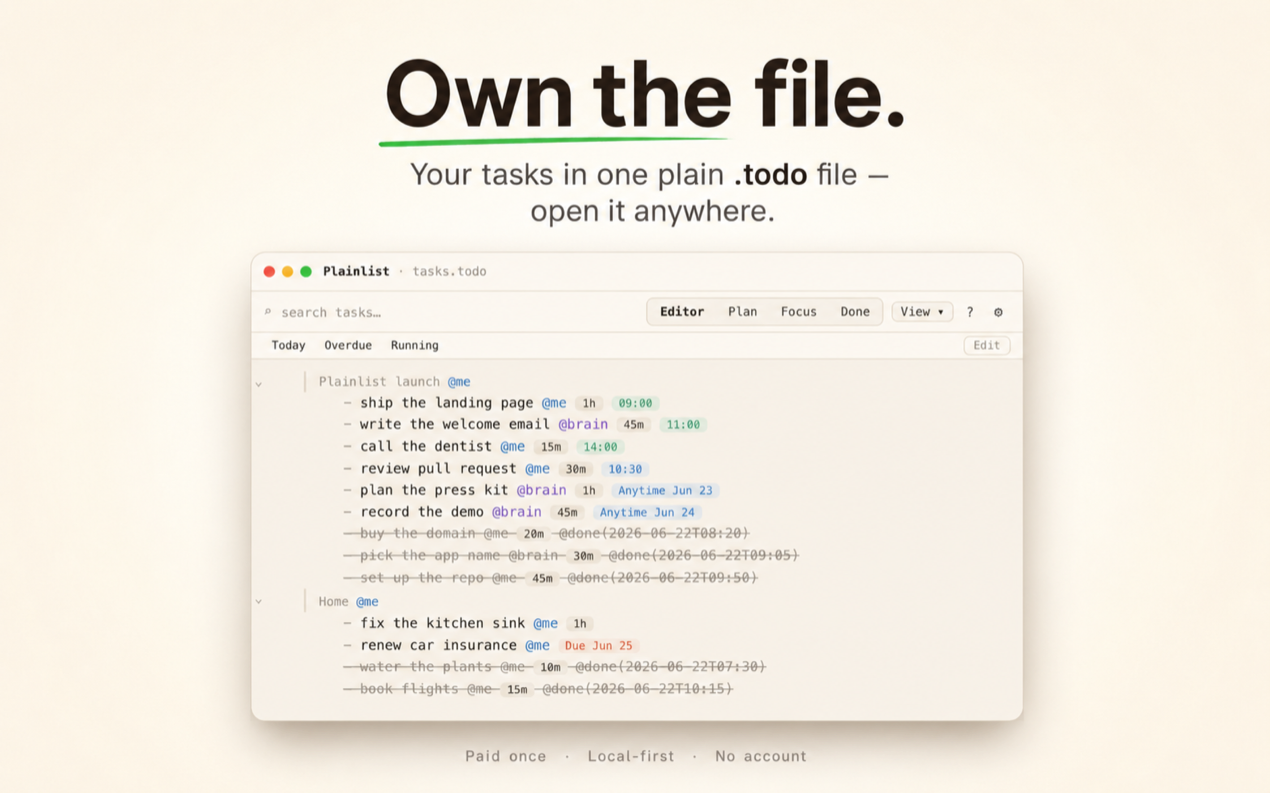
The result is a plaintext editor on one side and a calendar on the other, both showing the same file. Write "call Sam 3pm 30m" as a line of text, watch it land on the calendar at 3pm. Type a task, give it a date, done. For the first time, my to-do list had a shape I couldn't ignore. Overload became visible. Commitments became real.
The rest grew out of the same instinct. Habits live in the file as @every(mon/wed/fri) or @quota(3/week). Goals are lines marked with a timeframe, and when you finish one it moves to a done pile instead of vanishing. Nothing is a separate module. It's all one file, and the file is mine.
The format is TaskPaper-compatible plain text, which is a fancy way of saying it's just text with a few conventions. Open it in Vim, VS Code, or TextEdit. If the app vanished tomorrow, my plan wouldn't.
It's macOS-only today, which I'm not thrilled about. Windows, iOS, and Android are in progress. And there's no account and no cloud, by design: the file is yours, and you sync it however you already sync things, or you don't. For me that's the point. For some people it's a dealbreaker. I'm fine with that.
Also the money part, and I'll be direct: it's paid once, no subscription. I didn't want my task manager to be a rent payment. Your list shouldn't stop working because a billing cycle ended.
The counterarguments
There's the obvious one: plain text is "for developers." Normal people want buttons and colors. Fair enough. But look at what's actually happening: the buttons and colors aren't helping people plan, they're helping them avoid planning. The calendar view is the part that works, and you don't need a proprietary database to have a calendar. You need a file and a grid.
The other one is notifications. Some people genuinely want the app to nag them, and that's legitimate. If a reminder is what gets a task done for you, keep it. My experience was the opposite: the nagging trained me to ignore it, and then I felt guilty on top of being behind. I'd rather look at the week and decide. Notifications are the app's agenda interrupting yours; a file has no agenda to interrupt with.
And the third: what if you need your tasks on a phone? Honest answer: right now, on Plainlist, you don't get a mobile app yet. You get a text file that syncs through whatever folder you already use, and any text editor on the phone reads it. It's not as pretty, and it's not as fast as a native app. But it works.
What I believe now
Most productivity tools fail because they're built to be used, when they should be built to be ignored. A good system is one you stop thinking about. A text file is the closest thing we have. It's the task management equivalent of a chair that doesn't squeak. You only notice it when it's not there. That's the standard I hold my own tools to now: if I'm aware of the tool, it's not done yet.
If you're on your fourth to-do app this year, try something radical: type your tasks into a text file for one week. Put the file on your desktop. Nothing to configure, nothing to maintain, no streak to protect, nothing to feel guilty about when you open it. See what happens when nothing nags you, nothing tracks you, and the only thing between you and done is the work itself.
You might find, as I did, that the best to-do app is the one that got out of the way.
Try Plainlist
A paid-once planner over a plain text file you own. macOS now, Linux in beta.
Get Plainlist